
How to calculate the cost of your projects with man hours

If you manage projects, sooner or later you’ll face the same question: how much does labor actually cost me? The answer starts with mastering a simple but fundamental concept: man hours.
Man hours — also called person hours — are the unit of measure used in project management to quantify the effort needed to complete a task:
1 man hour = work completed in one hour of uninterrupted effort by an average worker.
From this unit you can measure the cost per project for each type of professional and their contribution to the result. Let’s see how.
Basic calculation: man hours per task
The total man hours per task is obtained by multiplying the number of people assigned to a task by the total time it takes to complete it.
Practical example
Suppose 15 workers at a metal plant devote 10 workdays to completing an order of 800 units. Estimating 6 productive hours per day:
15 workers × 10 days × 6 h/day = 900 man hours
With that figure, productivity is:
800 units / 900 h = 0.89 units per hour
Since we know the cost of a man hour, it’s straightforward to calculate how the labor force contributes to the unit cost and to the profitability of the product line. This ratio also serves as a starting point for measuring productivity improvements, introducing new processes, or cutting costs.
Reverse calculation: how many workers do you need?
The formula is often used in reverse — starting from the total project hours to determine how many people are required:
Total project hours / project duration = man hours per day
Then:
Man hours per day / productive hours per shift = number of workers needed
If we estimate 6 productive hours per shift (a conservative assumption), you’ll get a realistic team sizing.
Not all team members cost the same
In any reasonably complex project, the cost of man hours varies by the worker’s professional category. In an IT project, for example, one hour of a junior developer doesn’t cost the same as one hour of a software architect or a technical lead.
To calculate the total labor cost of the project, you must factor in each professional category:
Total cost = (CH₁ × MH₁) + (CH₂ × MH₂) + … + (CHₙ × MHₙ)
Where:
- CH = hourly cost of the professional category
- MH = total man hours estimated for that category
Example
| Category | Hourly rate | Estimated hours | Subtotal |
|---|---|---|---|
| Junior developer | $40 | 200 h | $8,000 |
| Senior developer | $75 | 150 h | $11,250 |
| Software architect | $110 | 60 h | $6,600 |
| Total | 410 h | $25,850 |
This breakdown is essential for building realistic budgets, negotiating rates with clients, and detecting cost overruns during execution.
Automate the calculation with ITM Platform
Running these calculations in a spreadsheet works at first, but becomes unmanageable when you’re handling multiple projects with dozens of people. ITM Platform automates man-hour cost calculations: you only need to configure three variables.
1. Professional profiles — define your organization’s categories (analyst, developer, project manager…).
2. Rates per profile — assign an hourly cost to each professional profile.
3. Standard costs — set a default rate that applies when hours are assigned to a generic resource.
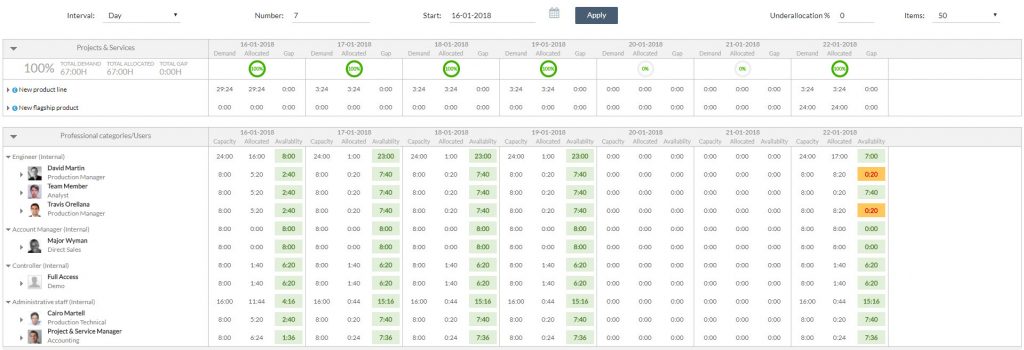
Once configured, ITM Platform automatically calculates the cost of every task and project as you assign resources — no manual formulas or parallel spreadsheets required.
See this tutorial for how to define professional profiles, rates, and standard costs.
Next steps
- Try ITM Platform for free and set up your profiles and rates in minutes.
- Download the e-book on building a sustainable PMO to learn how to centralize your project management.
Try ITM Platform free for 14 days
Start managing your projects, resources, and portfolios today.